On User Message Trigger
Message triggers allow you to execute a custom command when a message matches a specific condition.
message triggers can detect different types of messages, such as messages starting with specific text, messages containing attachments, polls, mentions, Discord system messages, and more.
Example
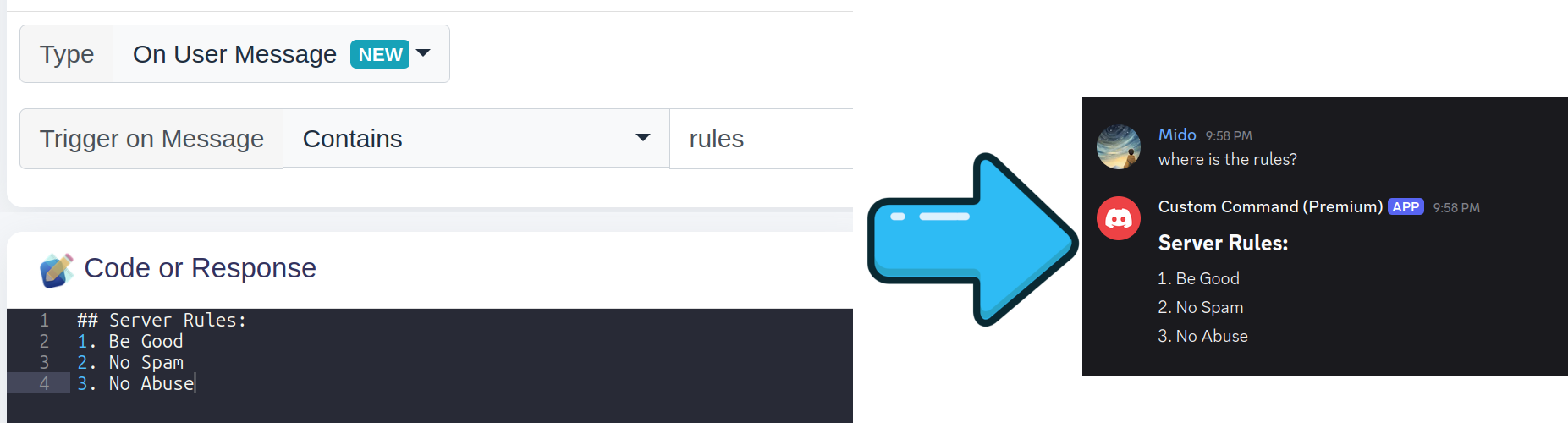
How message triggers work
When creating a message trigger, you can choose how the message should be matched.
The available options are:
| Type | Description |
|---|---|
| Starts with | Triggers when the message starts with the specified text |
| Ends with | Triggers when the message ends with the specified text |
| Contains | Triggers when the message contains the specified text |
| Exact Match | Triggers when the message exactly match the specified text |
| Prefix Match | Triggers when the message prefixed with the specificed text |
| Advanced (Regex) | Uses a regular expression to match the message |
| Contains attachment | Triggers when the message contains an attachment |
| Discord Pin Message | Triggers when Discord sends a pin notification |
| Discord Thread Created Message | Triggers when Discord sends a thread creation notification |
| Contains Poll | Triggers when the message contains a poll |
| Contains Sticker | Triggers when the message is a sticker |
| Has User Mention/Ping | Triggers when a user is mentioned in the message |
| Forwarded Message | Triggers when a message is forwarded |
| Discord Automod Action Message | Triggers when Discord AutoMod takes action on a message |
| Every Message | Triggers on every message |
Starts with
The Starts with option triggers when a message begins with the specified text.
For example, if the trigger is:
!helloand if the response code is
Hello $username!The command will trigger when a message starts with !hello.

!hello

Hello Member!
!hello everyone
Hello Member!
However, a message where !hello appears later will not trigger the command.
Hey !hello
This is useful for traditional commands such as !help, ?report, or !hug.
Ends with
The Ends with option triggers when a message ends with the specified text.
For example, with the trigger:
good morningand if the response code is
Good morning, $username!The command will trigger when the message ends with good morning.
Everyone, good morning
Good morning, Member!
Good morning
Good morning, Member!
A message where the text appears in the middle will not trigger the command.
Good morning everyone!
Contains
The Contains option triggers when the specified text appears anywhere in the message.
For example, using:
bananaand if the response code is
🍌 Banana detected!will trigger whenever banana appears in the message.
I really like bananas!
🍌 Banana detected!
Does anyone have a banana?
🍌 Banana detected!
The text does not need to be at the beginning or end of the message.
Exact Match
The Exact Match option triggers when the specified text matches exactly the message
For example, using:
bananaand if the response code is
🍌 Banana detected!will trigger whenever banana appears in the message.
banana
🍌 Banana detected!
bananas
Prefix Match
The Prefix Match option triggers when the message matches the prefix you specified
For example, using:
!workand if the response code is
You worked!will trigger whenever banana appears in the message.
!work
You worked!
!work something
You worked!
Advanced (Regex)
The Advanced (Regex) option allows you to use regular expressions for more advanced matching.
Regex is useful when a normal text match is not enough.
For example, the following expression detects a Discord user mention:
/<@!?\d{18,}>/and if the response code is
You have mentioned $username[$mentioned]! This can detect mentions such as:
Hey @Mido!
You have mentioned Mido!
Regex can be used to create much more advanced message matching rules.
What's regex?
Regex, short for regular expression, is a way of describing patterns in text.
It is an advanced feature and is not required for most message triggers. If you only need to detect a specific word or phrase, Starts with, Ends with, or Contains will usually be easier.
Contains attachment
The Contains attachment option triggers when a message contains an attachment.
This can be useful for creating commands that automatically react to images, files, videos, or other uploaded attachments.
For example:
Check out this image! [attachment: image.png]
Nice image!
The message does not need to contain any particular text.
Discord Pin Message
The Discord Pin Message option triggers when Discord sends a system message indicating that a message was pinned.
For example:
[Discord system message: A message was pinned]
A message was pinned!
This can be useful for automatically responding when someone pins a message.
Discord Thread Created Message
The Discord Thread Created Message option triggers when Discord sends a system message indicating that a thread was created.
For example:
[Discord system message: A thread was created]
A new thread has been created!
This can be useful for automatically responding to newly created threads.
Contains Sticker
The Contains Sticker option triggers when a message contains a sticker.
You can find the sticker id with $messageStickers, which can be used to get more information like name through $sticker
For example:
$sticker[$messageStickers;name]This example will show you the sticker name.
Has User Mention/Ping
The Has User Mention/Ping option triggers when a message contains a mention of a Discord user.
For example:
Hey @Mido, check this out!
Someone was mentioned!
The mention can appear anywhere in the message.
For example, all of these can trigger the command:
@Mido hello!
Hello @Mido!
Can someone help @Mido?
Forwarded Message
The Forwarded Message option triggers when a message contains a forwarded Discord message.
For example:
[Forwarded message]
This is the original message.
A message was forwarded!
This allows you to create commands that react specifically to forwarded messages without needing to inspect their text.
Discord AutoMod Action Message
The Discord AutoMod Action Message option triggers when Discord AutoMod takes action on a message.
For example, when a user sends a message that violates an AutoMod rule:
This message triggered AutoMod
AutoMod has detected a violation.
The user who triggered the AutoMod action is considered the executor of the command.
This allows you to build custom responses or logging systems around Discord AutoMod actions.
Every Message
The Every Message option triggers for every message received by the bot.
It does not matter what the message contains.
For example, a command configured with Every Message could automatically respond to messages:
Hello everyone!
Have a great day!
Does anyone want to play?
Have a great day!
This can be useful for automatic responses, message logging, counters, or other systems that need to process every message.
Use with caution
An Every Message trigger can execute very frequently in an active server.
If you only want the command to run in specific channels, use the Run only in option to restrict where the command can execute.
You should also consider using cooldowns to prevent excessive executions.
Parameters
Message parameters are separated by spaces and can be accessed using the $message[] function.
For example, if a user sends:
!hug @userThe message is split into parameters:
$message[1]→!hug$message[2]→@user
Each parameter is assigned a number based on its position in the message:
!hug hello world
 │    │     │
 │    │     └── $message[3]
 │    └──────── $message[2]
 └───────────── $message[1]
You can also use + to get a parameter and everything after it.
For example:
!announce Hello everyone, welcome!$message[1]→!announce$message[2]→Hello$message[2+]→Hello everyone, welcome!$message[3+]→everyone, welcome!
This is useful when you want to accept a message or sentence as a single parameter.
For example:
!hug @user
!report @user spam in the chat
!announce Hello everyone, welcome to the server!
For !report @user spam in the chat, you could use:
$message[2]  → @user
$message[3+] → spam in the chat
In short:
$message[1]  → first word
$message[2]  → second word
$message[3]  → third word
$message[n]  → nth word

$message[2+] → second word + everything after it
$message[3+] → third word + everything after it
Combining message conditions
The different trigger types are designed for different kinds of message detection.
For example:
| Goal | Recommended type |
|---|---|
Message starts with !help | Starts with |
Message ends with thanks | Ends with |
Message contains hello | Contains |
| Detect a complex pattern | Advanced (Regex) |
| Detect uploaded files | Contains attachment |
| Detect Discord pin notifications | Discord Pin Message |
| Detect newly created threads | Discord Thread Created Message |
| Detect polls | Contains Poll |
| Detect stickers | Contains Sticker |
| Detect user mentions | Has User Mention/Ping |
| Detect forwarded messages | Forwarded Message |
| Detect AutoMod actions | Discord AutoMod Action Message |
| Process every message | Every Message |
Choose the simplest option that matches what you are trying to detect. Regex should generally only be used when the other matching options cannot accomplish the desired behavior.
Summary
| Name | Example | Explanation |
|---|---|---|
| Starts with | !hello | Triggers when the message starts with the specified text |
| Ends with | hello | Triggers when the message ends with the specified text |
| Contains | hello | Triggers when the message contains the specified text |
| Exact Match | hello | Triggers when the message exactly match the specified text |
| Prefix Match | !work | Triggers when the message prefixed with the specificed text |
| Advanced (Regex) | /<@!?\d{18,}>/ | Uses a regular expression to match messages |
| Contains attachment | — | Triggers when a message contains an attachment |
| Discord Pin Message | — | Triggers when Discord sends a pin notification |
| Discord Thread Created Message | — | Triggers when Discord sends a thread creation notification |
| Contains Poll | — | Triggers when a message contains a poll |
| Contains Sticker | — | Triggers when a message contains a sticker |
| Has User Mention/Ping | — | Triggers when a message mentions a user |
| Forwarded Message | — | Triggers when a message contains a forwarded message |
| Discord AutoMod Action Message | — | Triggers when Discord AutoMod takes action |
| Every Message | — | Triggers for every message |
Choose the right trigger
For normal text matching, prefer Starts with, Ends with, Contains, Exact Match or Prefix Match. Use Advanced (Regex) when you need more complex patterns, and use the specialized message types when you want to detect Discord-specific message features.
For Tier 3+, this trigger requires the Message Content Intent to be enabled for your custom bot when using the following trigger settings:
Starts withEnds withContainsExact MatchPrefix MatchAdvanced (Regex)Contains attachmentContains Poll