 Custom Command
On User Command (Context Menu)
Basic Information
This trigger runs when a user selects your custom command from another user's context menu.
The command is triggered by the user who selected the action, while the selected user becomes the target of the command.
For example, if @Mido right-clicks @Zero and selects your custom command:
$userID→ User ID of Mido, the user who triggered the command$eventTargetID→ User ID of Zero, the selected target user$commandName→ The name of the context menu command
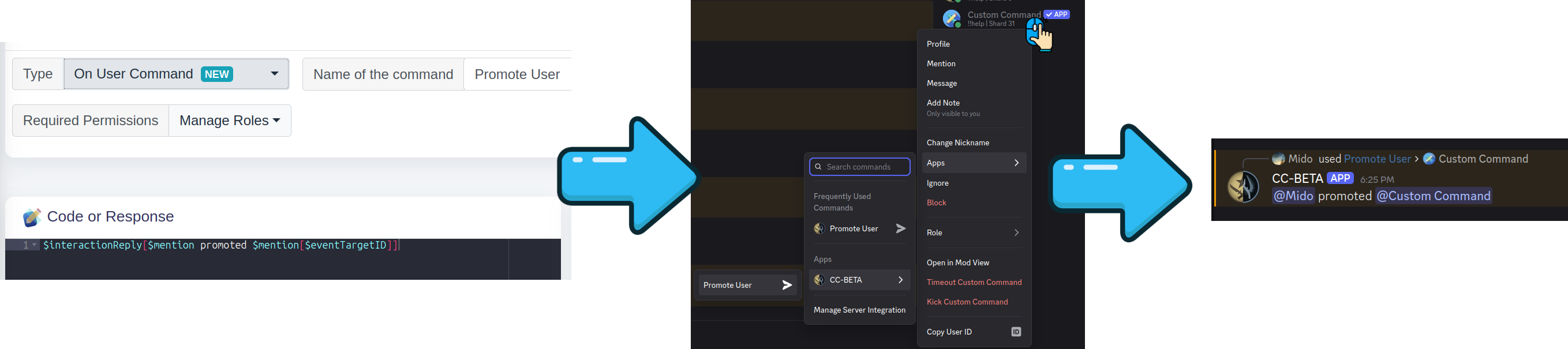
Syntax
The trigger value is the name of the context menu command.
For example:
Promote UserThe command will appear as Promote User in the user's context menu.
Example
Create a new custom command and set its Trigger Type to On User Command (Context Menu).
Set the trigger to:
Promote UserYou can then use the target user's ID to perform actions on them.
For example:
$giveRoles[$eventTargetID;Supporter]
$interactionReply[Promoted $mention[$eventTargetID] to Supporter!]
If @Mido selects Promote User on @Zero, the command will give the Supporter role to Zero.
That's it! 🎉
Command Limits
Discord allows a maximum of 15 User context-menu commands per server.
The command name must also be unique among User context-menu commands in that server.
For example, you can have:
Promote User
Ban User
View Profile
Give Supporter
but you cannot register two User context-menu commands with the same name.
Some functions related to On User Command
$userID: Returns the ID of the user who triggered the context menu command.
$eventTargetID: Returns the ID of the user selected from the context menu.
$commandName: Returns the name of the context menu command that was triggered. This is the same as the command's trigger value.
$interactionReply: Send the reply of the user command menu action