 Custom Command
On Message Command (Context Menu)
Basic Information
This trigger runs when a user selects your custom command from a message's context menu.
The command is triggered by the user who selected the action, while the selected message becomes the target of the command.
For example, if @Mido right-clicks a message from @Zero and selects your custom command:
$userID→ User ID of Mido, the user who triggered the command$eventTargetID→ Message ID of the selected message$message→ The selected message content$commandName→ The name of the context menu command
Syntax
The trigger value is the name of the context menu command.
For example:
Report MessageThe command will appear as Report Message in the message's context menu.
Example
Create a new custom command and set its Trigger Type to On Message Command (Context Menu).
Set the trigger to:
Report MessageYou can then use the selected message's ID to retrieve information about the message or perform actions related to it.
For example:
$interactionReply[Message reported successfully!]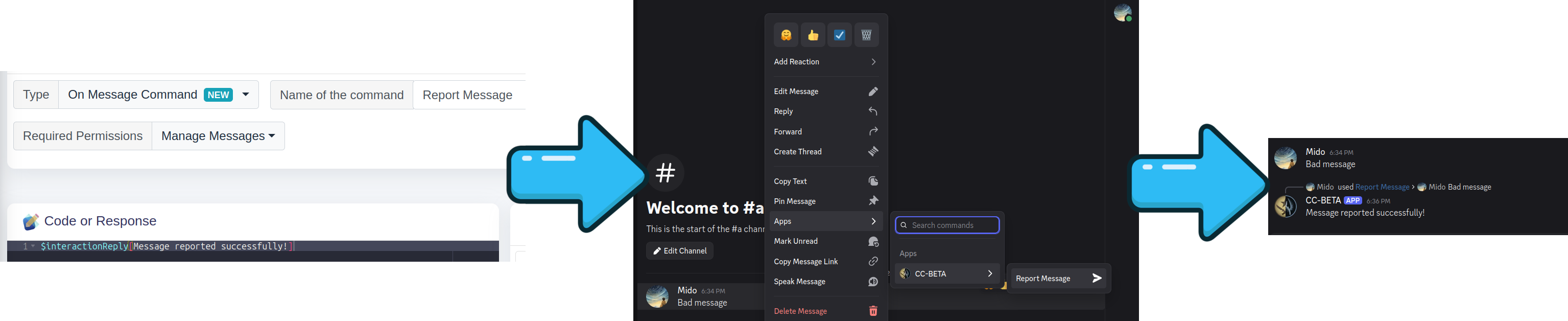
The selected message can be accessed using $eventTargetID or $messageID.
You can also use $msg to get information about the selected message, such as its author or content.
For example:
$interactionReply[Message by <@$msg[$eventTargetID;author]> has been reported!]If @Mido selects Report Message on a message sent by @Zero, the command can access Zero's message and respond accordingly.
That's it! 🎉
Command Limits
Discord allows a maximum of 15 Message context-menu commands per server.
The command name must also be unique among Message context-menu commands in that server.
For example, you can have:
Report Message
Delete Message
Quote Message
Translate Message
but you cannot register two Message context-menu commands with the same name.
Some functions related to On Message Command
$userID: Returns the ID of the user who triggered the context menu command.
$eventTargetID: Returns the ID of the message selected from the context menu.
$messageID: Returns the ID of the message selected from the context menu.
$commandName: Returns the name of the context menu command that was triggered. This is the same as the command's trigger value.
$interactionReply: Sends a reply to the context menu interaction.
$msg: Provides information about the selected message, such as its author, content, and other message properties.