FunctionsMessage Functions
$channelSendMessage
Sends a message to a specified channel. This function allows you to send messages to any channel your bot has access to.
Usage
$channelSendMessage[channelID;message;return ID (yes/no) (optional, default=no)]| Parameter | Description | Required | Default |
|---|---|---|---|
channelID | The ID of the channel to send the message to. You can get this by right-clicking the channel and selecting "Copy ID" (you must have Developer Mode enabled in Discord settings). | Yes | |
message | The message to send. This can be plain text, embeds, buttons, menus, or any other valid Discord message content. | Yes | |
return ID | yes or no. If yes, the ID of the sent message will be returned. Defaults to no. This is useful if you need to edit or delete the message later. | No | no |

Member
9/5/2026
!!exec $channelSendMessage[879431439299543040;This is a fantastic message!;no]

Custom Command
APP
9/5/2026
This is a fantastic message!
Examples
Here are some examples of how to use the $channelSendMessage function:
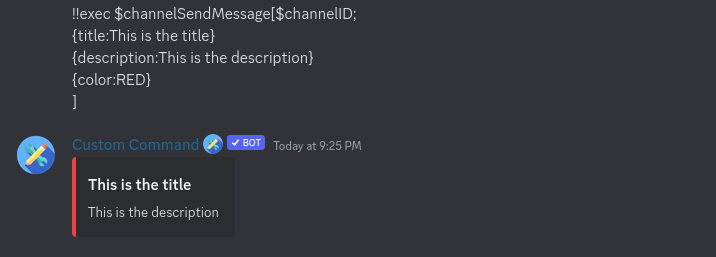
Send an Embed
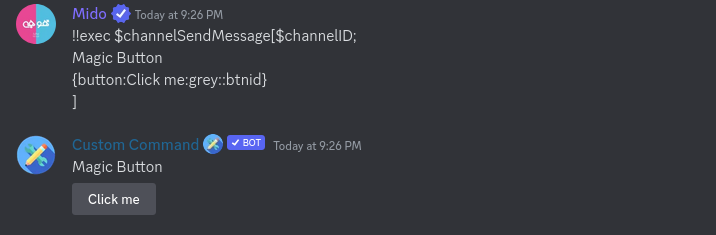
Send a Button
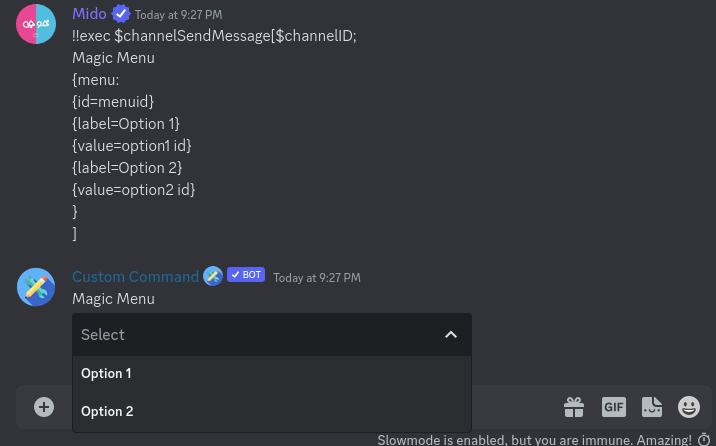
Send a Menu
You can send more complex messages with features like footers and fields by using the Message Curl Format. This format allows for more detailed control over your messages.
Related Functions
$sendMessage: Sends a message to the channel where the command was used.
Function difficulty: Medium
Function Cooldown
This function has built-in cooldown. Why? Read more about cooldowns here.
- Cooldown: 2 seconds
- Tracked By: User
- Type:
channeluser
Functions with the same type share cooldowns based on the same Tracked By value.